Compass North
<h2 id="step-1:-make-it"><strong>Step 1: Make it</strong></h2>
<p> </p>
<h3 id="what-is-it?">What is it?</h3>
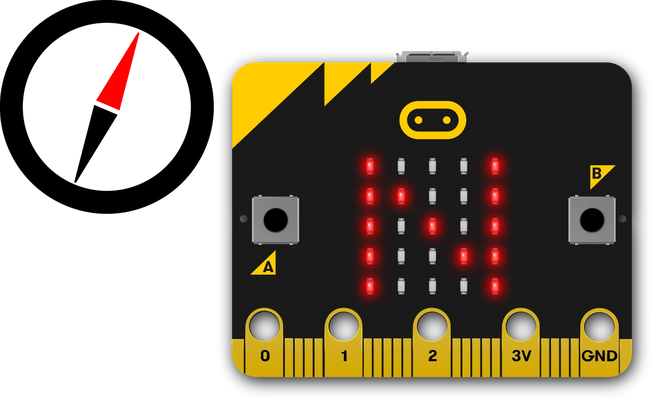
<p>This simple compass will show you which way is North.</p>
<p> </p>
<p><img alt="micro:bit showing N for North on LED display next to compass pointing North" loading="lazy" src="https://cdn.sanity.io/images/ajwvhvgo/production/db90b21b419e4140635f958476ff548bb5ee8b1e-1911x1171.png?w=653&q=80&fit=max&auto=format" style="width: 550px;" /></p>
<h3> </h3>
<h3 id="how-it-works"><strong>How it works</strong></h3>
<ul>
<li>Your micro:bit has a <a href="https://microbit.org/get-started/features/sensors/#compass">compass sensor</a> called a magnetometer that measures magnetic fields. It can sense the Earth’s magnetic field and so you can use it as a compass.</li>
<li>When you first use the micro:bit compass you have to calibrate it. A little game appears on the screen where you have to tilt the micro:bit to light up every LED, then you’re ready to go.</li>
<li>The program uses an infinite (forever) <strong>loop</strong> to keep taking compass readings and it stores them in a <strong>variable</strong> called ‘bearing’. It then uses <strong>selection</strong>: an <strong>if… else</strong> statement to show N for North on the <a href="https://microbit.org/get-started/features/leds-and-buttons/#leds">LED display</a> <strong>if</strong>the bearing is greater (>) than 315 degrees <strong>or</strong> less than (<) 45. This means that it will show you where North is as long as your micro:bit is pointing in roughly the right direction.</li>
</ul>
<p> </p>
<h3 id="what-you-need"><strong>What you need</strong></h3>
<ul>
<li>micro:bit (or MakeCode simulator)</li>
<li>MakeCode or Python editor</li>
<li>battery pack (optional)</li>
<li>a planet with magnetic poles to stand on, such as Earth!</li>
</ul>
<p> </p>
<h2 id="step-2:-code-it"><strong>Step 2: Code it</strong></h2>
<p> </p>
<p><u><strong>MakeCode</strong></u></p>
<p><strong><img alt="" src="/api/storage/uploads/legacy-images/yh5nbdum5wxceqgt8uysbhj0592b/Unknown-3.png" style="width: 650px; height: 312px;" /></strong></p>
<p> </p>
<p><u><b>Python</b></u></p>
<pre>
<code>1from microbit import *
2compass.calibrate()
3
4while True:
5 bearing = compass.heading()
6 if bearing < 45 or bearing > 315:
7 display.show('N')
8 else:
9 display.show(' ')
10</code></pre>
<p> </p>
<p><a href="https://classroom.microbit.org/?id=compass-north&project=Project%3A%20Compass%20North&name=compass%20north&editors=makecode%2Cpython">Open in Classroom</a></p>
<p><a data-testid="editor-link" href="https://python.microbit.org/v/3#import:#project:XQAAgAA8AQAAAAAAAAA9iImmlGSt1R++5LD+ZJ36cRz46B+lhYtNRoWF0nijpaVyZlK7ACfSpeoQpgfk21st4ty06R4PEOL2bYcmzBlBlijQ6LC98tdl/gMz9fyLk7tDZBS2PT8ibixGOPSAzmJRxmxu6F1pd4XiOAFwdN1RocnSksJGptPNI6lWXIrRhEufR0QqBBz2kbPiBf38CN46bHIDWXYbx+qsWSes08+efxPWZrO1lLKqL3wljpnbzWZEBlaOSbElRwQuj0Dx/51Il2PqTzcIn5Iy2dv9g6qA">Open in Python</a></p>
<p><a href="https://microbit.org/downloads/compass-north-python.hex">Download HEX</a></p>
<p><a data-testid="editor-link" href="https://makecode.microbit.org/#pub:_Fxi79gEXmA72">Open in MakeCode</a></p>
<p> </p>
<h2 id="step-3:-improve-it"><strong>Step 3: Improve it</strong></h2>
<ul>
<li>Make the compass more accurate by reducing the range of bearings: make the number 45 smaller and 315 bigger.</li>
<li>Add other points of the compass to show when the micro:bit is pointing East, West and South.</li>
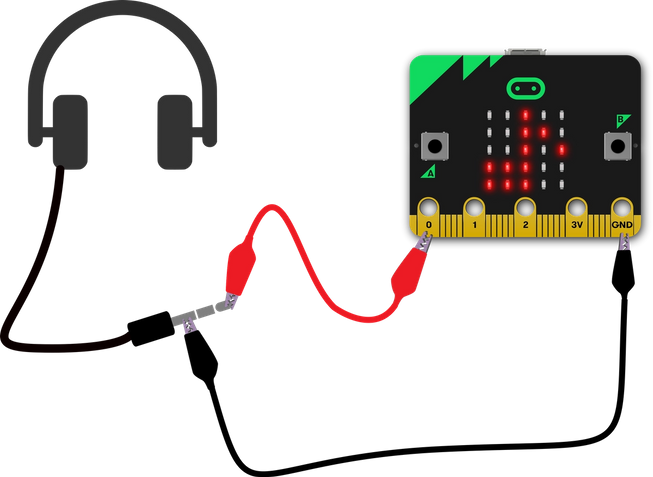
<li>Add <a href="https://microbit.org/get-started/features/sound-output/">sound</a> so it makes a noise when pointing North so someone who is visually impaired can use the compass.</li>
</ul>
<p> </p>
<p><img alt="Compass rose showing numerical bearings for N, S, E, W, NE, SW etc" loading="lazy" src="https://cdn.sanity.io/images/ajwvhvgo/production/c1ba4627f246bc638f48cd51afb80342fd1db540-2019x1878.png?w=653&q=80&fit=max&auto=format" style="width: 550px;" /></p>